


myQ Garage & Access Control
3.658.66K Reviews
App Specs
- Version
- 5.316.0.1131466
- Updated On
- License
- Free
- Downloads
- 10,000,000+
- Developer
- The Chamberlain Group LLC
- Categories
- Lifestyle
- Platform
- Android, iOS
Screenshots
 Analysis by AppCompare
Ever felt like you’ve transformed into a forgetful wizard, trying to remember if you closed the garage door? Say hello to myQ Garage & Access Control, your new best friend that ensures you never have to make a U-turn halfway to work to double-check. Let’s dive into why this app might just be the magical solution you’ve been waiting for.
A household tool, not just a remote
The clearest benefit shows up when the garage is part of a shared routine. One person may leave early, another may come home later, and someone else may need to get a car out while the usual driver is away. In that kind of household, being able to check the door’s status from a phone can settle a practical question without calling around or driving back to look.
A realistic example: I’m already on the road when I start wondering whether the garage door was closed after everyone left. Rather than interrupting the day to ask who remembers, I can check the app and act if needed. That is a small convenience, but it addresses a recurring household uncertainty rather than adding another screen for its own sake.
The distinction matters: a phone-based garage control app is most useful when the household already has compatible myQ equipment installed. It is not a universal remote that can make any existing door opener connect on its own. Before relying on it, I would check that the equipment in the garage supports myQ and that the person setting it up can access the relevant device and account. That simple check can prevent a frustrating download-and-disappointment cycle.
Seamless Access and Control
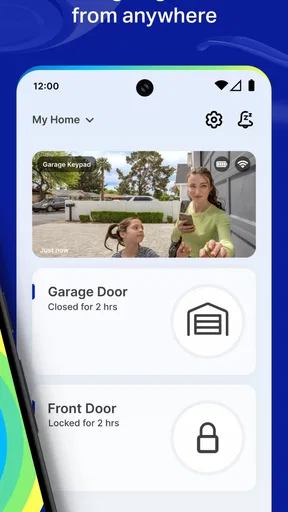
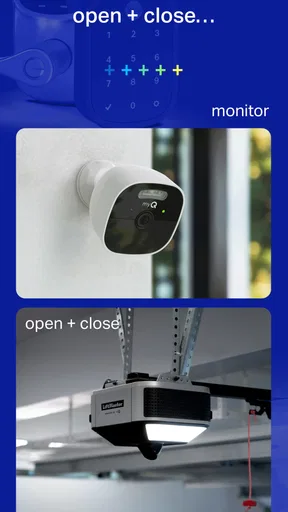
Imagine being able to control your garage door with just a tap on your phone. With myQ Garage & Access Control, you can do just that! This app lets you open, close, and monitor your garage door from anywhere. Whether you’re lounging on the couch or on a beach halfway across the world, your garage door is just a touch away.
The setup is surprisingly straightforward. Once you’ve installed the myQ device in your garage (don’t worry, it’s a breeze!), connecting it to the app is as simple as pie. It took me no time at all, and I was up and running, feeling like a tech-savvy superhero.
Setting up with sensible boundaries
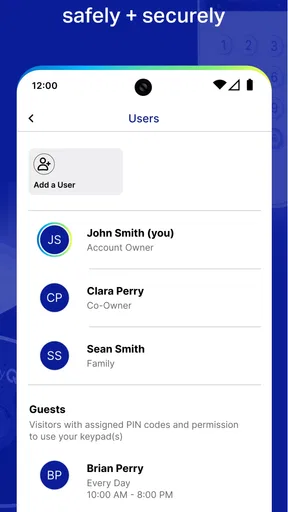
For shared use, I would decide early whose account will manage the connected garage equipment and which household members genuinely need access. That is less about adding formal restrictions and more about avoiding a muddle of separate logins, old phones, and unclear responsibility. The app is a control point, so the household should agree on who is expected to check the status and who should contact the account holder if something seems wrong.
Worth Reading Before You Choose

Flipboard Shows What News Apps Must Do Beyond the Feed

Switching to Android Auto Means Rethinking Your Driving Routine

Google Calendar Makes a Crowded Week Easier to Manage

Ludo King Makes the Most of the Minutes Between Plans

Baby Panda World Brings Quick Play to Modern Phones, but Its Game Library Feels Busy

ESPN’s Live Game View Makes Following Close Games Easier
Before anyone depends on remote operation, test the basic routine while at home: confirm the app can show the door’s state, try the controls, and make sure the household understands what each action does. A quick practice run is especially useful for someone who is not comfortable with smart-home devices. It also helps reveal whether the setup is dependable in the place where the garage is actually used, rather than assuming that a successful sign-in means every routine is ready.
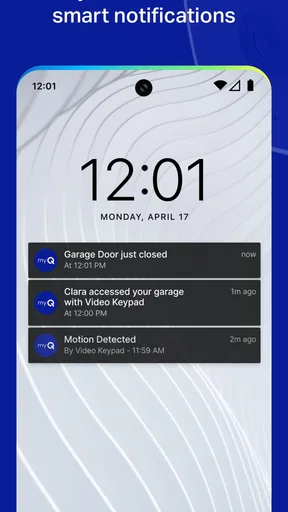
I would also treat notifications as useful prompts, not as a substitute for judgment. A message that the door has opened or closed can help explain what happened, but people still need to agree on what to do if an alert arrives unexpectedly. For example, a household might decide that the person nearest home checks first, while the account holder handles any app or equipment issue. That kind of simple plan is more valuable than giving everyone access without discussing how it will be used.
Notifications and Real-Time Alerts
One of the standout features is the real-time alerts. Ever had that niggling doubt about whether you left the garage door open? With myQ, you can receive notifications whenever your garage door opens or closes. It’s like having a personal assistant that ensures you’re always in the loop.
You can even schedule specific times for the door to open or close, making it perfect for those early morning commutes or late-night returns. It’s all about making life easier, and honestly, who wouldn’t want that?
Making coordination work day to day
Shared access can reduce the little handoffs that otherwise happen by text: “Are you home?” “Did you shut the door?” “Can you let me in?” But convenience depends on keeping the routine clear. If one person is coordinating a delivery or a household member’s arrival, they should be clear about whether they are asking someone to operate the door or merely checking its status. A quick check before tapping is a sensible habit, especially when several people are coming and going.
Schedules can suit a predictable routine, such as a regular weekday departure, but they are not automatically better than manual control. Plans change, and a preset action may not fit a day when someone is working from home or leaving at a different time. I’d use scheduled opening or closing only when the timing is genuinely stable and everyone affected knows about it. For occasional arrivals, a deliberate tap is easier to adapt and less likely to surprise another person.
Compared with a conventional garage remote, the app’s practical difference is that it lets you check and operate the door through a phone rather than relying only on the handheld control. A remote is simpler for someone who wants one button and no account or setup; the app is more helpful when the user is away from home or when more than one person needs to coordinate around the garage. Neither option replaces good household communication, and I would keep the familiar physical routine available rather than making every arrival depend on a phone.
Integration with Smart Home Systems
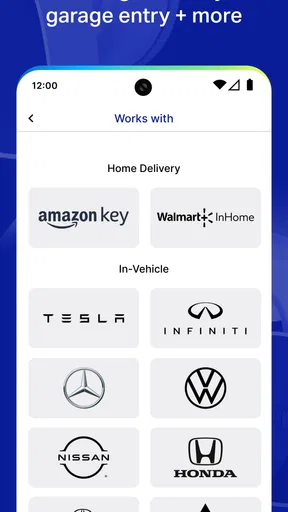
If you’re all about that smart home life, you’ll be pleased to know that myQ integrates smoothly with various smart home systems. Whether you’re using Google Assistant or Amazon Alexa, you can control your garage door with just your voice. Talk about feeling like you’re living in the future!
The app also plays nice with other smart devices, allowing for a seamless integration into your already tech-savvy home. It’s like adding another layer of convenience to your everyday life.
What to expect from a connected routine
Voice control and other smart-home connections can be convenient, but I would not make them the only way a household can operate the door. A phone may be unavailable, a voice assistant may misunderstand, or a guest may not know which device to use. Keeping the app’s direct controls familiar and explaining the ordinary garage routine to household members makes the setup more resilient than assuming every integration will always be the quickest path.
There is also a real trade-off in bringing a physical entry point into a connected home. Remote access can be reassuring when you need to check the door while away, but it makes account care and device habits part of home security. I would use a strong, private account login and avoid sharing credentials casually. If a person no longer needs access, review the household’s account arrangements rather than letting an old phone or login remain part of the routine indefinitely.
Age, trust, and who should use it
The app is rated Everyone, which makes it suitable in age terms for a broad audience, but a garage door is still a real moving entry point. A younger household member may be able to use a phone comfortably without being ready to decide when it is appropriate to open or close the door. I would explain the household rules in plain language and make sure anyone who uses the controls understands that they should check the area and coordinate with people nearby.
That is not a claim that the app provides special family controls; it is a reminder that household trust comes from clear expectations. If only one adult should manage access, keep account responsibility with that person and communicate how others can request help. If several trusted adults share the routine, agree on who responds to alerts and who maintains the setup. The app can support coordination, but it cannot make those decisions for a family.
This is a good fit for people who already use compatible myQ equipment, want remote status checks, and have a household routine that benefits from shared awareness. It is less compelling for someone who never needs to operate the garage while away and is satisfied with a standard remote. It may also be the wrong choice for a household unwilling to maintain an account or learn a connected-device workflow. In those cases, a straightforward opener and remote may be more dependable simply because they involve fewer steps.
Security and Peace of Mind
Security is always a top concern, and myQ delivers in this department. The app uses robust encryption to ensure that your garage door access is secure. Plus, knowing you can check on your garage door status anytime gives you that extra peace of mind.
For those who often have packages delivered, the app even offers integration with Amazon Key. This feature allows for secure in-garage delivery, keeping your packages safe from porch pirates. Pretty nifty, right?
Practical trade-offs before relying on it
Remote control is powerful precisely because it changes who can act on the garage door and when. I would avoid opening it simply because someone says they are outside; confirm that the request is expected and that the household knows who is arriving. For deliveries, the in-garage option may be useful to people who want that arrangement, but it is a specific use case rather than a reason everyone needs the app. If porch delivery already works well, there is no need to change the routine just to use another feature.
MyQ is a lifestyle app from The Chamberlain Group LLC, and its usefulness is closely tied to that connected-garage role. It is free, has an average rating of 3.7 from around 122,000 ratings, and has passed 5 million installs. Those figures suggest it is widely used, while the rating is a reminder that connected-home experiences can vary. I would focus less on popularity and more on whether your equipment, household habits, and comfort with account-based access make the app worthwhile.
The app first appeared on August 29, 2011, and its current version is 5.299.0.91702, with Android 7.1 as the minimum operating system. It is intended for everyone. If you are choosing it for an older phone or setting it up for another household member, check the device’s software compatibility before building the garage routine around it. Once installed, keep the app updated and periodically make sure the person responsible for the account can still access it; that small bit of upkeep matters more than adding features the household will never use.
One question people often have is whether this replaces the garage opener itself. It does not: the app works as the phone-based control and monitoring side of a compatible setup, so the installed myQ equipment remains central. Another practical question is whether it helps when nobody is home; remote access is useful for checking and operating the door away from home, but it is still wise to use it only when you know why the door needs to move. And if the household is deciding between app control and a normal remote, the answer depends on whether remote checking and coordination solve a real recurring problem or merely add another way to do something a button already handles.
For a shared household, I’d begin with one clearly responsible account holder, test the setup together, and decide how alerts and requests will be handled. That approach avoids treating access as an informal favor while still allowing the app to make arrivals and departures easier. If that sounds like a useful change to your routine, myQ is worth considering; if you prefer a simple remote and rarely need to check the door from elsewhere, staying with that simpler option is perfectly reasonable.
In conclusion, myQ Garage & Access Control is a game-changer for anyone looking to add convenience and security to their home. It’s easy to use, packed with features, and offers a level of control that’s hard to beat. So, if you’re tired of second-guessing whether you closed the garage door, this app might just be the answer to your prayers. Happy controlling!
Pros
- Easy setup and installation.
- Compatible with most garage door brands.
- Real-time notifications for door status.
- Secure
- encrypted access control.
- User-friendly interface and navigation.
Cons
- Requires stable internet connection.
- Limited to specific smart home integrations.
- Subscription needed for advanced features.
- Occasional delays in app response.
- No offline access to controls.
FAQs for myQ Garage & Access Control
What is myQ Garage & Access Control and how does it work?
myQ Garage & Access Control is an app that allows users to monitor and control their garage doors and gates remotely. By connecting the app to your compatible smart garage door opener, you can open or close your garage from anywhere, receive notifications about its status, and even integrate with smart home systems for enhanced convenience.
Is myQ Garage & Access Control compatible with all garage door openers?
The app is compatible with a variety of smart garage door openers, but not all models may be supported. It's essential to check the compatibility list on the myQ website or contact their support to confirm if your specific model is supported to ensure seamless operation and access.
What security features does myQ Garage & Access Control offer?
myQ Garage & Access Control prioritizes security with features like real-time notifications when your garage door is opened or closed, secure access with unique user credentials, and the ability to set schedules for when the door should automatically open or close. These features help ensure that your home remains secure at all times.
Can I integrate myQ Garage & Access Control with other smart home devices?
Yes, myQ can be integrated with several smart home systems such as Google Assistant, Amazon Alexa, and IFTTT. This integration allows you to create a more cohesive smart home experience, enabling voice commands and automating routines that include your garage door as part of your daily activities.
Are there any subscription fees associated with myQ Garage & Access Control?
The app itself is free to download and use for basic features. However, some advanced integrations, like those with certain smart home ecosystems, may require a subscription fee. It is recommended to review the app’s pricing details to understand any potential costs associated with premium features.


